
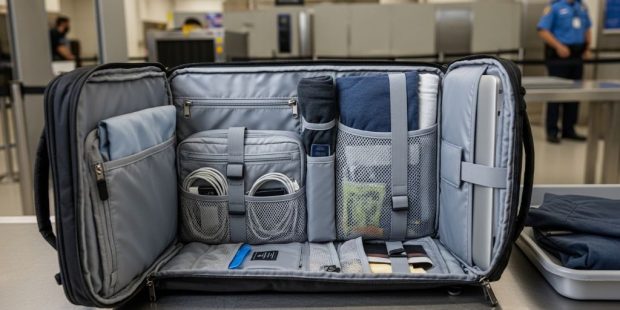
Traveling through airports can be stressful. Long lines, strict rules, and tight schedules all add pressure. However, the right backpack can make a big difference. A TSA approved backpack is designed to move through security checkpoints quickly and smoothly.
Many travelers do not realize how much their bag affects the airport experience. A poorly designed backpack can slow down the entire process. Therefore, choosing the right one before your next trip is one of the smartest decisions you can make. This guide will walk you through everything you need to know.
What Makes a Backpack TSA Approved
Not every backpack is created equal. TSA approved backpacks are designed with specific features that meet Transportation Security Administration guidelines. These bags make it easier for security scanners to read the contents clearly.
The most important feature is a lay-flat laptop compartment. When you reach a security checkpoint, you must remove your laptop from your bag and place it in a separate bin. A checkpoint-friendly backpack has a dedicated section that opens completely flat. This allows the laptop to stay inside the bag while passing through the X-ray machine at many airports.
Additionally, the bag must be free of metal frames, thick padding around electronic pockets, and other materials that can block scanner images. A clean interior design makes the entire screening process faster. This benefits you and every traveler behind you in line.
Why Your Bag Choice Matters at Security
Think about the last time you saw a security line come to a halt. Chances are, someone had a bag that caused confusion on the scanner. This happens more often than most people realize.
When a bag is disorganized or has too many compartments packed tightly, the X-ray image becomes hard to read. Security officers then have to pull the bag aside for a manual inspection. This wastes time for everyone involved. Furthermore, it can cause you to miss your flight if the delay is long enough.
Choosing one of the well-designed travel bags built for airport use removes this risk entirely. You walk through security with confidence. Your bag goes through the scanner without issues. Then you are on your way to the gate in no time.
Key Features to Look for in a TSA Friendly Backpack
A Dedicated Laptop Compartment
This is the most essential feature. Look for a backpack that has a separate laptop sleeve that opens completely flat. The sleeve should hold your laptop securely without additional straps or buckles that could confuse the scanner.
The laptop compartment should be padded enough to protect your device. However, it should not be so thick that it creates shadows on the X-ray image. A slim but firm padding works best. Most quality bags specify whether the compartment is TSA checkpoint friendly on the product label or description.
Multiple Organized Compartments
Organization is everything when you travel. A good TSA friendly backpack should have several separate sections. One for your laptop, one for documents and small electronics, and one for personal items like a water bottle or snack.
When each item has a designated place, packing and unpacking becomes much faster. Therefore, you spend less time scrambling at the security bin and more time moving efficiently through the terminal. Additionally, organized bags are less likely to trigger a secondary inspection because each item is clearly visible and separate.
Durable and Lightweight Materials
Weight matters when you are carrying a bag through airports, onto planes, and across unfamiliar cities. Look for backpacks made from lightweight but durable fabrics like ripstop nylon or high-density polyester. These materials hold up well under pressure and do not add unnecessary weight.
Zippers are another important detail. Choose a backpack with smooth, lockable zippers. They should glide easily and feel sturdy. Cheap zippers break at the worst possible moments. Investing in a bag with quality zippers will save you frustration in the long run.
Comfortable Carry System
A backpack that is not comfortable to wear is not a good travel companion. Look for padded shoulder straps with adjustable settings. A padded back panel adds comfort during long walks through large airports.
Some backpacks also include a sternum strap and a hip belt. These help distribute weight evenly across your body. Therefore, even a fully packed bag feels manageable during a long travel day. Comfort should never be an afterthought.
Size and Carry-On Compliance
Before you buy any backpack, check the carry-on size limits for your airline. Most airlines allow personal items up to a certain dimension. A backpack that is too large will be forced into the overhead bin or, worse, checked at the gate.
The most common personal item size limit is around 18 x 14 x 8 inches. However, this varies by airline. Always check the specific guidelines before purchasing. A bag that fits under the seat in front of you is ideal for short trips and gives you easy access to your belongings throughout the flight.
Materials That Help or Hurt at Security
The material of your backpack affects how it appears on an X-ray scanner. Some materials are more scanner-friendly than others.
Nylon and polyester are excellent choices. They are lightweight and appear clearly on X-ray machines. Leather backpacks can sometimes create denser images that are harder to read. Additionally, bags with built-in metal frames or reinforcements can raise flags during screening.
Avoid backpacks that have lots of external metal clips, buckles, or decorative hardware. While these may look stylish, they can trigger alerts at the scanner. Simpler is always better when it comes to getting through airport security tips quickly and without delay.
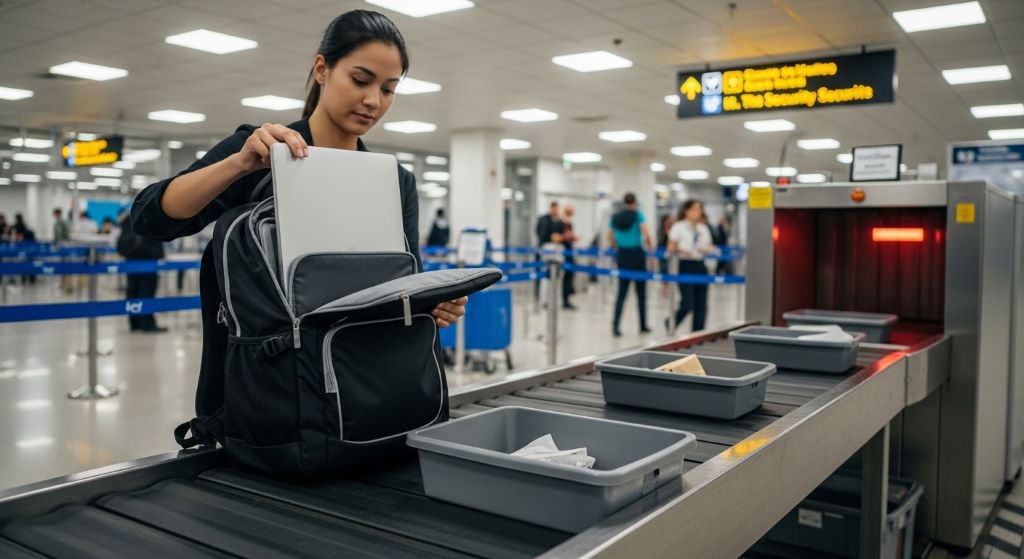
Packing Your TSA Approved Backpack the Right Way
Even the best backpack will cause problems if it is packed poorly. Here are some simple packing guidelines to follow every time you travel.
- Place your laptop in its dedicated compartment and nothing else. Do not stuff papers or chargers in the same sleeve.
- Keep all electronics like tablets, cameras, and chargers in one section. This makes them easy to remove if asked.
- Store liquids in a clear, quart-sized zip bag and place it at the top of your bag for easy access.
- Remove all loose change and metal items before you reach the checkpoint. Place them in your bag before you even get in line.
- Avoid overpacking. A bag that is stuffed too full is hard to scan clearly and difficult to repack after inspection.
Following these steps each time you travel will make airport security feel like the easiest part of your journey.
Top Things to Avoid When Buying a Travel Backpack
Many travelers make common mistakes when shopping for a travel backpack. Knowing what to avoid saves you time and money.
Do not buy a backpack based on looks alone. A beautiful bag that lacks the right compartments will frustrate you at every checkpoint. Function must come before fashion, though the two do not have to be mutually exclusive.
Additionally, avoid buying a bag that is too large for your needs. A bigger bag tempts you to overpack. Overpacking means extra weight, possible baggage fees, and a harder time moving through the airport.
Do not skip reading reviews. Other travelers will often mention whether a bag passes through security easily. Their firsthand experience is one of the most reliable guides you can use. Look for reviews that specifically mention airport use and carry-on compliance.
Finally, do not ignore warranty information. A quality travel backpack is an investment. Many reputable brands offer lifetime warranties or repair programs. This protects your purchase and gives you peace of mind on every trip.
How to Test a Backpack Before You Travel
Once you have purchased a backpack, test it before your first trip. Pack it the way you would for a real journey. Then try to lay it flat. Can it open completely on the laptop side? Does the laptop slide in and out easily?
Walk around your home with the bag fully loaded. Does it feel balanced? Do the straps dig into your shoulders? Is the back panel breathable? These tests reveal problems before you are standing in an airport security line.
Furthermore, practice removing and replacing your laptop quickly. Speed matters at checkpoints. The faster you can unpack and repack, the smoother your experience will be. A few minutes of practice at home can save you significant stress later.
Recommended Bag Styles for Different Travelers
Different trips call for different bags. Here is a quick breakdown of which style suits each type of traveler.
For business travelers, a slim professional backpack with a padded laptop compartment and a quiet, neutral design works best. It looks polished in meetings and moves easily through busy airports.
For weekend adventurers, a mid-sized backpack with multiple compartments and a rugged exterior is ideal. Look for water resistance and reinforced stitching for added durability.
For students and young travelers, a lightweight bag with bright colors and fun design options offers personality without sacrificing function. Make sure it still has a checkpoint-friendly laptop sleeve regardless of the style.
For frequent international flyers, consider a backpack with anti-theft features like hidden zippers and RFID-blocking pockets. These details add a layer of security when you are navigating unfamiliar destinations.
Conclusion
Selecting the right backpack is one of the most important steps toward a smoother travel experience. A TSA approved backpack saves you time, reduces stress, and helps you move through airport security with ease.
Focus on finding a bag with a lay-flat laptop compartment, organized sections, durable materials, and a comfortable carry system. Always check airline size guidelines before purchasing. Pack your bag properly every time and practice at home before your first trip.
Travel bags designed specifically for airport use are widely available at different price points. You do not need to spend a fortune to find one that works well. With the right backpack on your shoulders, every journey becomes a little more enjoyable from the moment you step into the terminal.
Frequently Asked Questions
What is a TSA approved backpack?
A TSA approved backpack is a bag designed to pass through airport security checkpoints quickly and without issues. It typically features a lay-flat laptop compartment that allows the device to remain in the bag during X-ray screening at qualifying airports.
Do I have to remove my laptop if I have a TSA approved backpack?
At many airports with standard X-ray machines, you still need to remove your laptop. However, airports with advanced CT scanners may allow checkpoint-friendly bags to go through without removing the laptop. Always follow the instructions of the security officer on duty.
What size backpack is allowed as a carry-on?
Most airlines allow personal item backpacks up to approximately 18 x 14 x 8 inches. However, size limits vary by airline. Always check your specific carrier’s guidelines before traveling to avoid problems at the gate.
Are all travel bags with laptop sleeves considered TSA friendly?
No. A laptop sleeve alone does not make a bag TSA friendly. The bag must have a sleeve that opens completely flat, with no other items blocking the laptop compartment. The design must allow a clear X-ray image to pass through without obstruction.
How do I keep my backpack organized at airport security?
Pack your backpack with intention before every trip. Keep your laptop in its own sleeve, store liquids in a clear bag at the top, and group all electronics together. Remove loose metal items before you reach the checkpoint. A well-organized bag moves through screening quickly and reduces the chance of a manual inspection.
Related Topics:
Discover Spain’s Largest Cities: Population, Culture, and Attractions
Budget-friendly Exotic Places to Travel in the World
